Every feature and add-on, explained
See what a normal day looks like for each person, then every add-on in plain words. Every company gets the core. Everything else is one of 129 add-ons you switch on when you need it, and off when you don't. An add-on that needs another one says so.
The core
Every companyWhat every NAEON company has from the first day.
Office staff get an email invitation; factory and warehouse staff get a personal activation code. Management sign in with two-factor authentication, and a phone can be unlocked with a quick PIN.
Each person sees only what their role allows. Start from NAEON's ready-made roles for your type of company and adjust them.
Your departments and branches, so requests reach the right manager and figures add up per site.
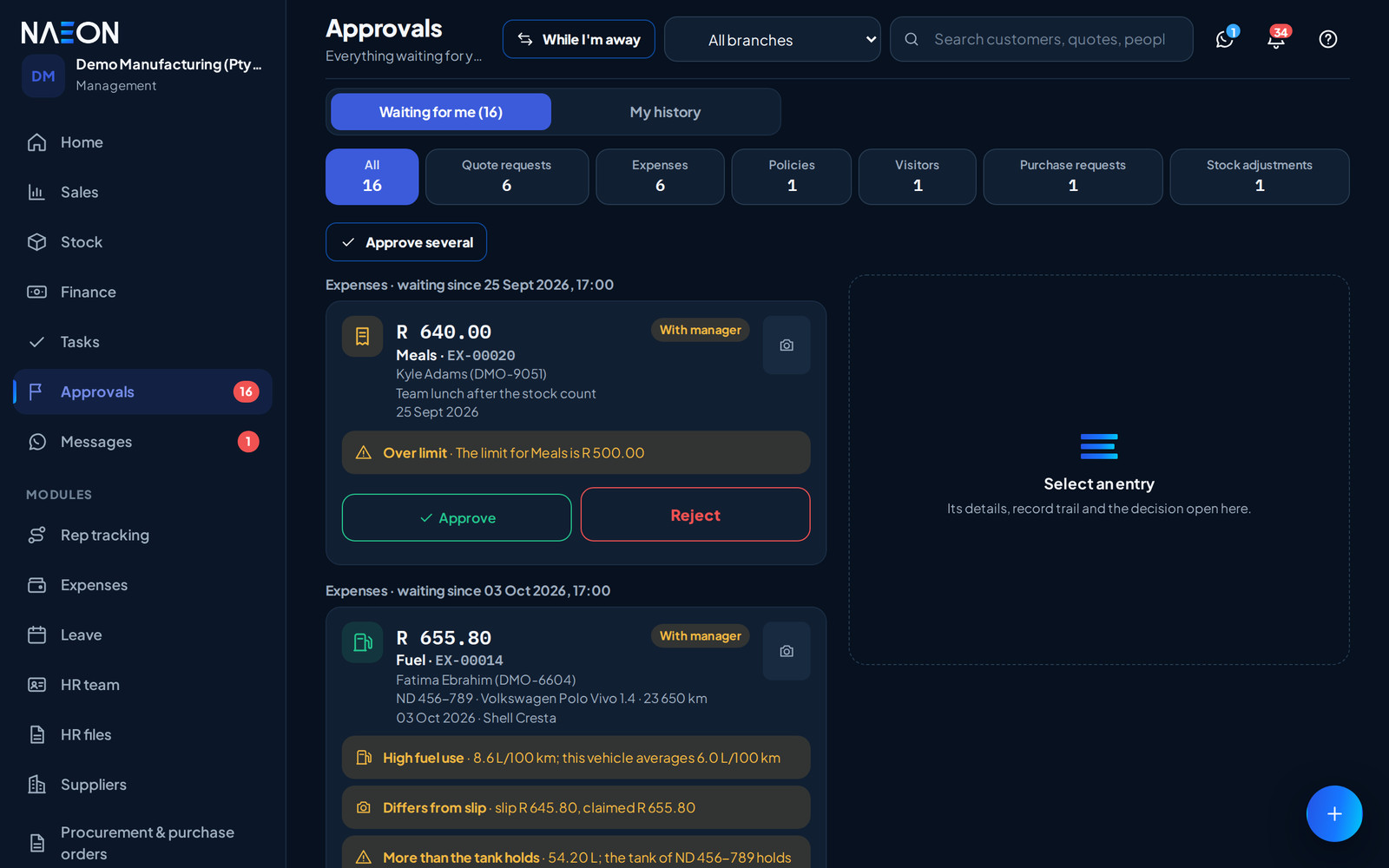
Every request waiting for someone lands in one inbox, on any device. Nobody can approve their own request; routine items can be approved in bulk; a request can be withdrawn, fixed and resubmitted, showing what changed.
Created, approved or rejected, carried out and completed: who did it and when. The audit log keeps sensitive views and changes too.
The bell in the app and push notifications, chosen per person and per type, with quiet hours at night. Approvals and security alerts always come through.
Your logo and colour, light or dark mode, and a data-light mode for people on small data bundles.
Each person's own details, their signed-in devices, a download of their own data and a request to remove their account.
How work moves through NAEON
Someone records it where the work happens: a quote request at the customer, a fuel slip at the pump, a load update at the border.
It goes to the right person's approvals inbox. They approve or reject it, with a reason.
The person who acts on it records that it was done, for example finance sending the quote.
The record closes, and its trail shows who did each step and when.
NAEON doesn't replace your accounting system. Tax invoices, credit notes and statements stay there; finance takes the approved figures across with import-ready files.
One app, every role
9 rolesWhat each person does in NAEON on a normal day. Everyone sees only what their role allows and what the company has switched on. The screens are from NAEON's demo companies, with sample data.
Sales rep
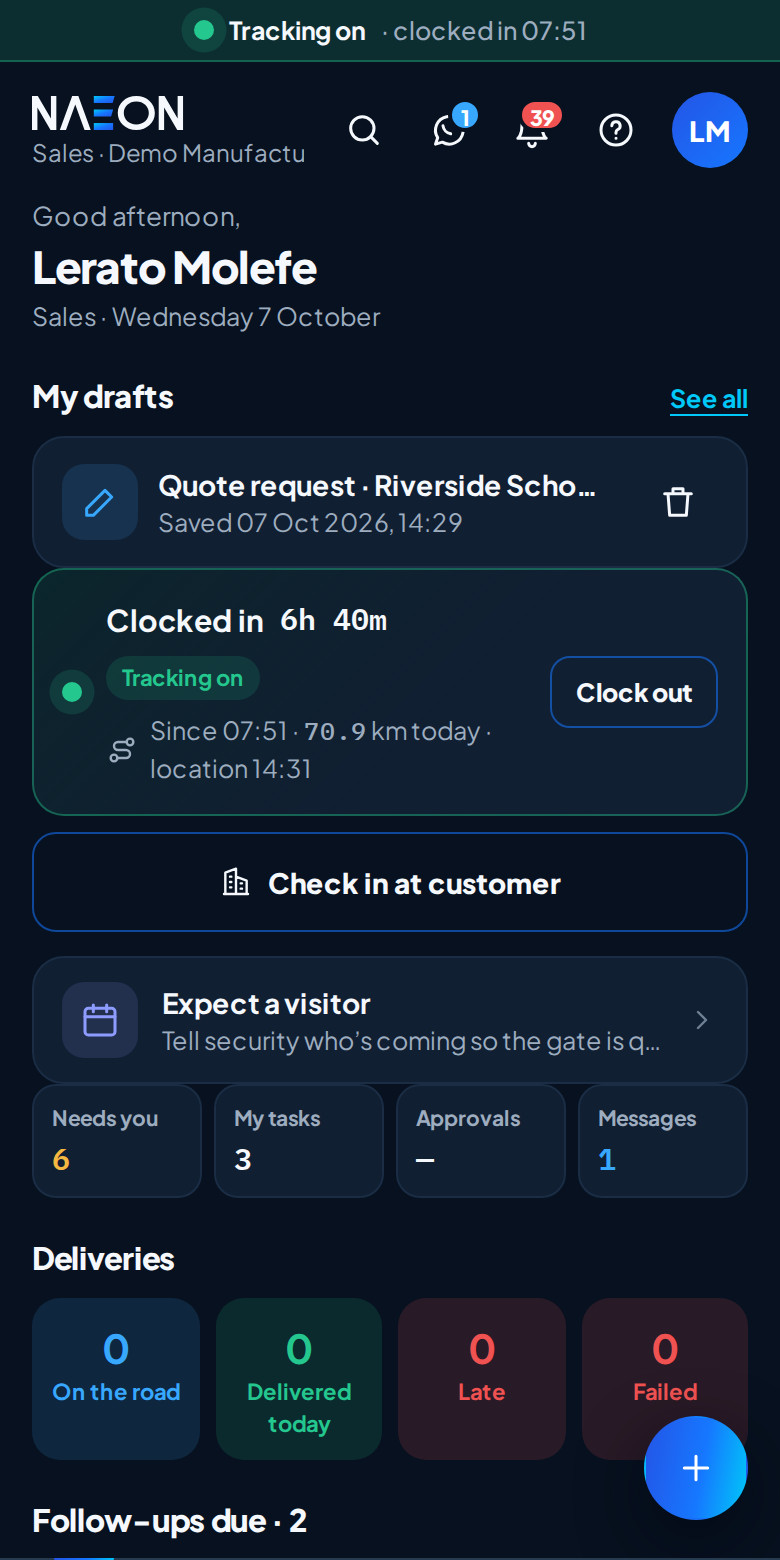
A rep's day runs on their phone, from the first customer to the last follow-up.
- Clocks in on the phone. With Rep tracking on, they read the tracking notice once and kilometres are recorded only while they're clocked in.
- Opens today's visit plan and checks in at the customer. Away from the site, the check-in asks for a reason.
- Captures a quote request with lines from the price list, and sees what's in stock and what's on order.
- The request goes to the sales manager, and to management where your route says so. When finance sends the quote, the rep is told to follow up.
- Logs the call or visit on the customer's timeline, and watches the monthly target on their home.
Built in: A rep sees their own figures only, never cost prices or the gross margin.
Finance
Finance gets work that's already approved, with the trail behind it.
- Receives signed-off quote requests, sends the quote and records it, so the rep is told.
- Records customer payments and part payments, and follows up outstanding totals and accounts on hold.
- Approves expense claims and fuel slips after the line manager, and reimburses them in bulk.
- Takes approved claims and fuel into Sage, Xero or another system with import-ready files, never twice.
- Downloads the payroll export file for the pay period, in the company's own layout.
Built in: Nobody approves their own claim, finance included.
HR
HR keeps the people side in one place instead of a filing cabinet and a spreadsheet.
- Adds people, or imports the staff list, and gives factory staff a personal activation code.
- Decides leave against balances and the leave calendar, with public holidays, half days and clash warnings.
- Files contracts, IDs and certificates, with alerts before they expire.
- Publishes policies and sees who has read and acknowledged them.
- Runs shifts, swaps and overtime pre-approval, training and onboarding checklists, where those add-ons are on.
Built in: Sensitive views, like disciplinary records, are recorded every time someone opens them.
Factory floor
Operators don't need their own device or email address. They share a tablet at the line.
- Taps in on the shared tablet with their employee number and PIN, and clocks in at the tablet's site.
- Opens My jobs, starts a job and works through its steps, with the work instruction and current drawing on screen.
- Records output and scrap as they go. Scrap above the limit goes to the supervisor to approve.
- Reports a breakdown: the machine shows as down, a work order is raised, and maintenance and the supervisor are told.
- Is signed out after each turn, so the next person taps in.
Built in: Quality control never inspects output they produced themselves.
Security at the gate
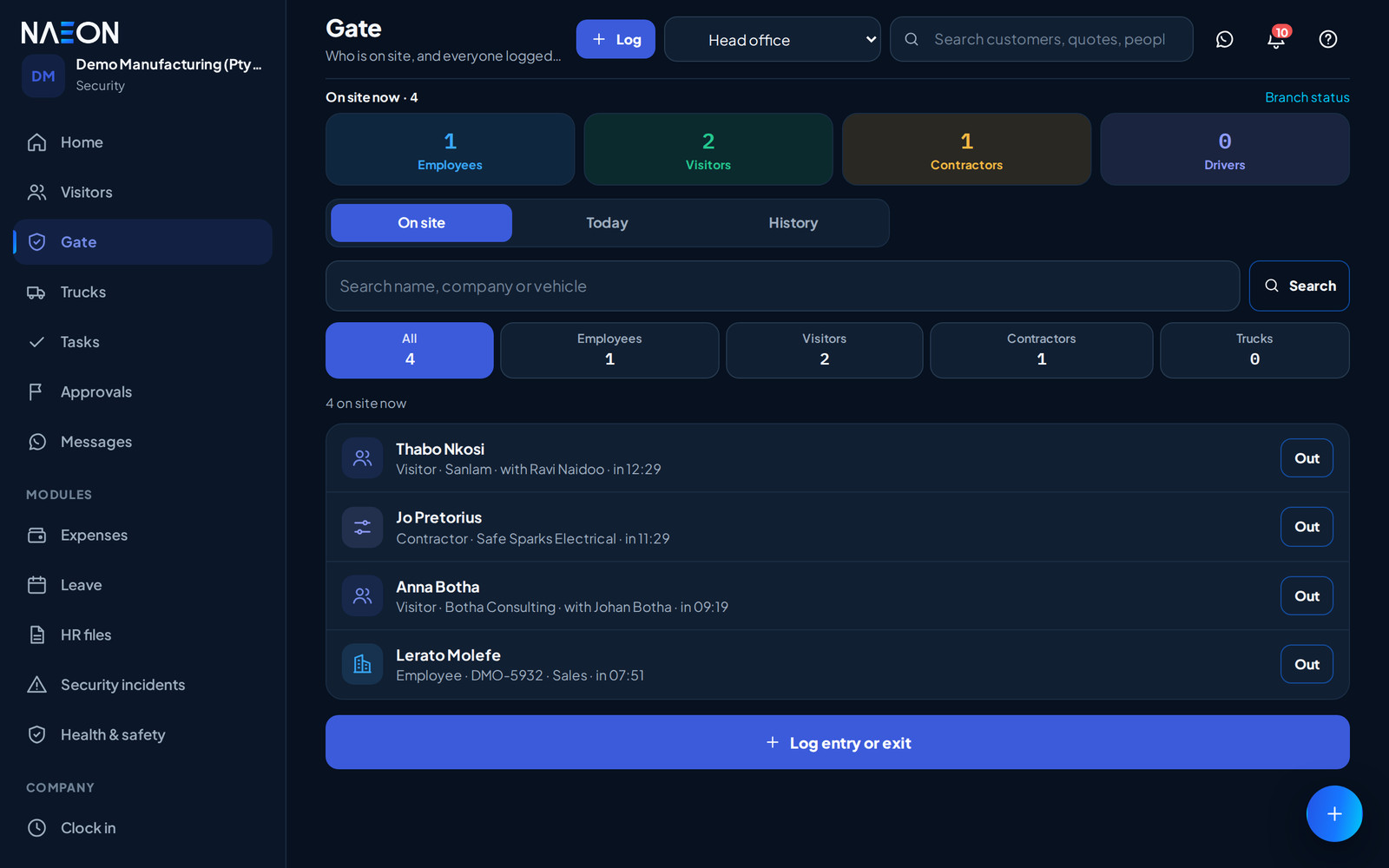
The gate knows who is on site, who is expected and what may leave.
- Logs a walk-up visitor; the person they're visiting approves from their own home screen.
- Checks contractors against the approved list and their induction before letting them in.
- Logs trucks in and out, and confirms that a loaded dispatch truck may leave, or stops it with a reason.
- Clocks employees in and out at the gate as their attendance.
- Starts an emergency roll call and ticks people off at the assembly point.
Built in: Visitor names stay out of the audit trail, and visitor records are deleted after your chosen period.
Controller / dispatcher
The controller books, plans and follows every load, and keeps the customer informed.
- Books a load for a customer with its pickups and drop-offs, from saved places. The rate comes from the customer's rate card for that lane.
- Plans the day on the planning board: loads onto trucks, trailers and drivers, part loads, driver changeovers and backhaul suggestions. A truck that's off the road or a driver with expired documents is flagged before it goes.
- Follows the live board, with each load's last position, estimated arrival and late alerts.
- Shares a track-and-trace link with the customer, who sees the load's progress and POD but never the driver's details.
- Closes the load at POD received, and the Unbilled loads list shows finance what to invoice.
Built in: A rate changed beyond the allowed margin waits for sign-off, and nobody signs off their own.
Driver
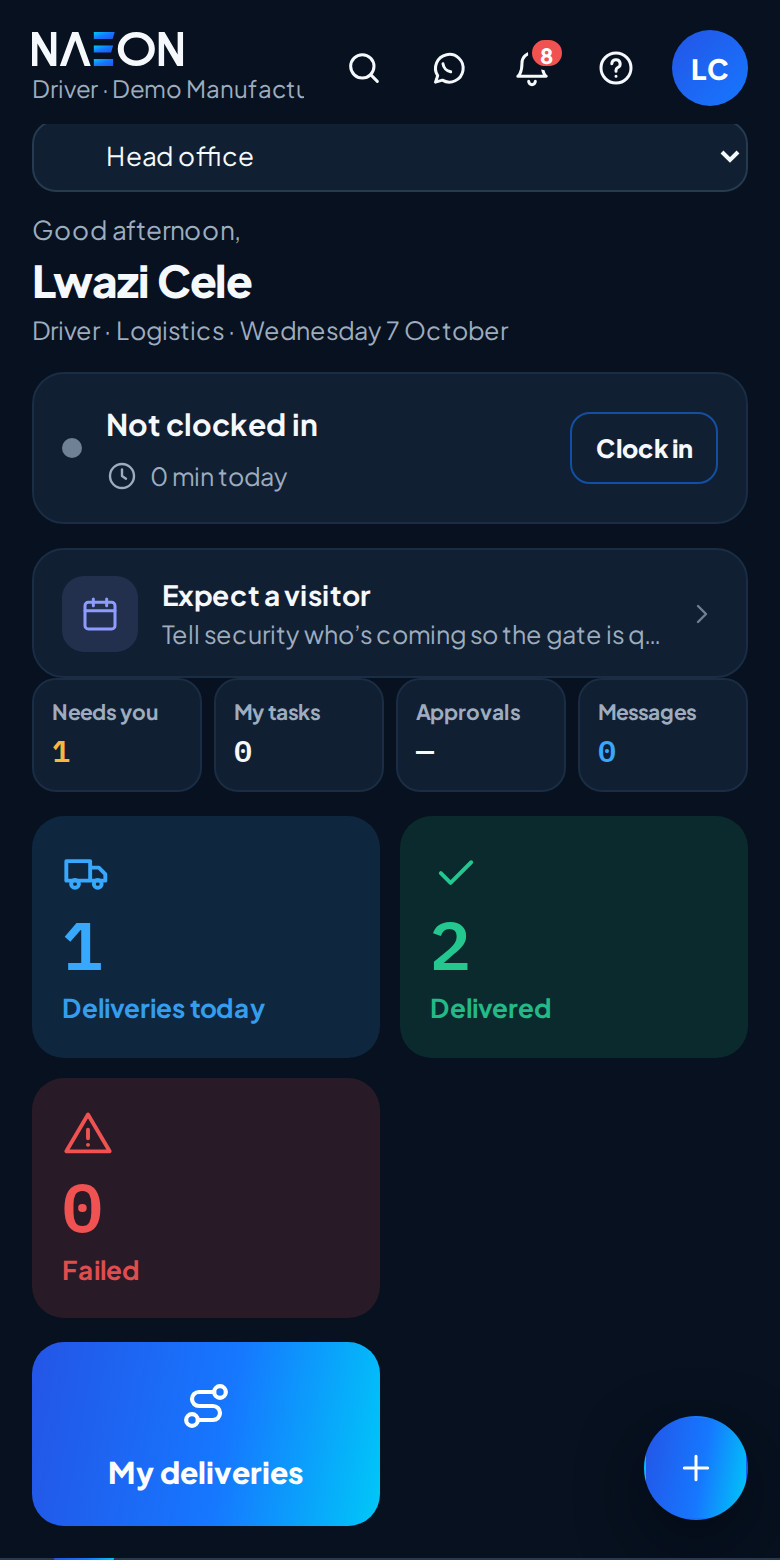
Everything the driver needs is on one phone screen, next stop first.
- Does the vehicle check before use. A major defect with a photo takes the truck off the road.
- Starts the trip. With Truck tracking on, positions are recorded only while the trip runs, after the driver has acknowledged the tracking notice.
- Presses Navigate to open the stop in Google Maps or Waze. Near the stop, the screen asks whether to mark Arrived.
- Records proof of collection (pallets, seal numbers, weighbridge ticket, photo) and, at the drop-off, the POD with the receiver's name and signature. Without signal, it's kept on the phone and sent later.
- On a cross-border load, records each crossing step in order. In trouble, a press-and-hold panic button alerts the company's nominated people with the truck's position. It doesn't call the police or armed response.
Built in: A driver never sees rates, prices or other drivers' loads.
Fleet controller
The fleet controller keeps trucks, trailers and drivers legal and on the road.
- Keeps vehicles and trailers with their licence, COF and service reminders, and drivers' licences and PrDPs.
- Reviews each trip's track and the kilometres against the odometer. Only the fleet controller and management see tracks, and every view is recorded.
- Follows driver hours and behaviour scores, and decides what to do about a flag. NAEON never decides about a person by itself.
- Nominates traffic fines to the driver on the trip at the time, and follows accident and cargo claims, tyres and diesel.
- Builds the RTMS audit pack for a period and site.
Built in: Passport, visa and work-permit numbers are shown only on request, and every view is recorded.
Management
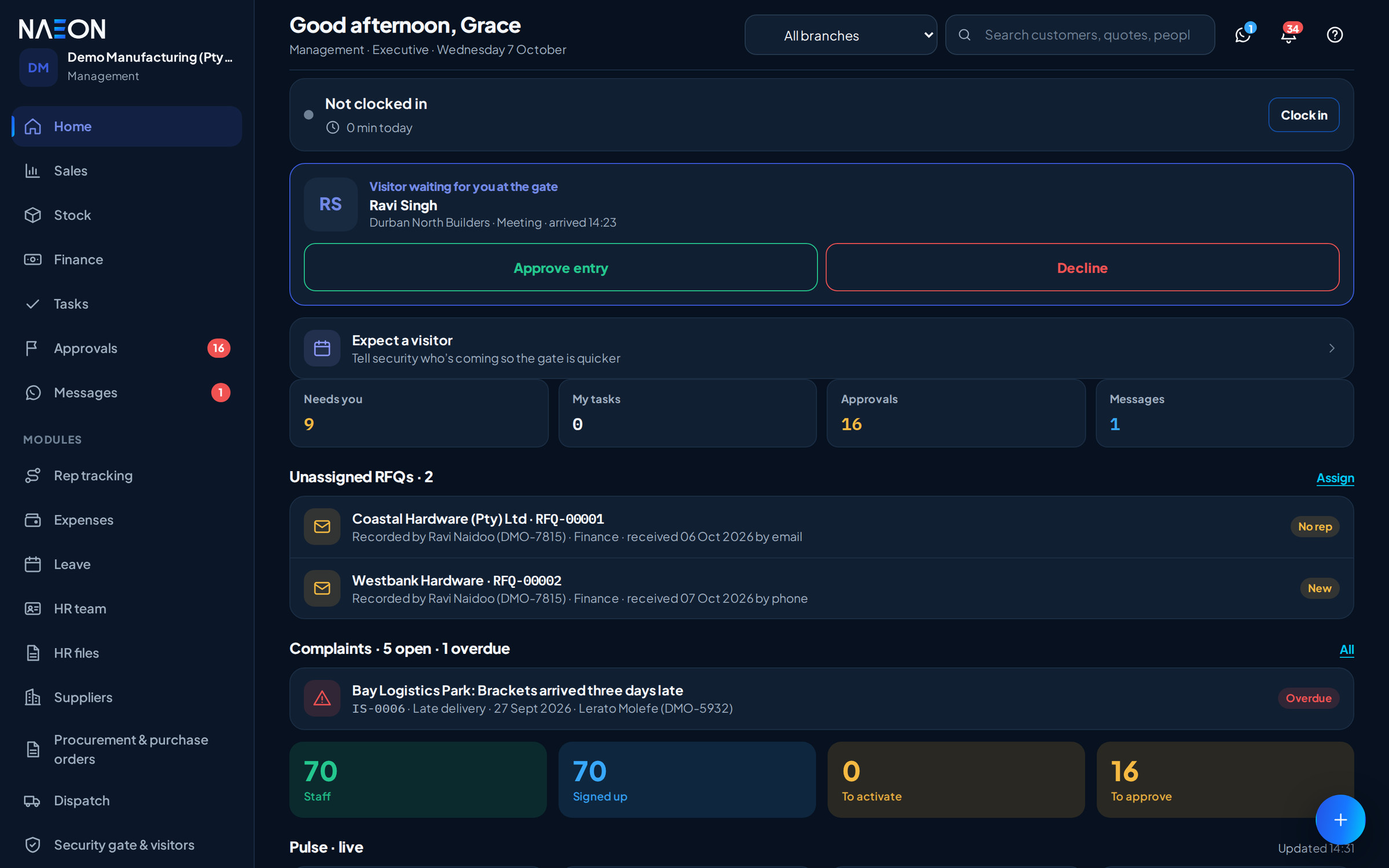
Management sees the whole company without chasing anyone for an update.
- Opens the management home: approvals waiting, sales, cash collected, staff on site and each department's figures.
- Approves from the phone, one at a time or routine items in bulk, with flagged ones held back.
- Opens reports for any area, compares periods and exports them, including profit per load, truck and customer for transporters.
- Is told when something needs them, through the company's cross-department alerts.
- Reads the Monday summary of last week, if the optional AI weekly summary is on.
Built in: Even management can't approve their own request.
Sales and customers
14 add-onsLeads, quotes, orders and customers, with your reps on the road.
Customers, price list, leads and quote requests.
Clock-in with location, customer visits and the team view.
Needs Sales and Attendance and clock-inCredit limits, accounts on hold and the collections log.
Needs Sales and FinanceRecord returns and the credit note numbers finance enters.
Needs Sales and FinanceApprovers see when a discount puts the margin below the minimum.
Needs SalesWhere leads come from and why deals are lost, with win/loss figures.
Needs SalesWeekly visit plans per rep, planned against actual.
Needs Rep trackingCustomer check-ins only near the site, or flagged with a reason.
Needs Rep trackingAgreed prices and standing discounts per customer, approved like a quote request.
Needs SalesEvery call, email and visit with a customer, and complaints from open to closed.
Needs SalesCommission rules per rep, role or product group. calculated per month with the lines it came from. approved by the sales manager and marked paid by finance.
Needs SalesRegions with an owner rep and a backup. customers and leads by territory. a territory moves to another rep in one step. performance per territory.
Needs SalesEach customer's usual ordering cycle, last order, trend, complaints, overdue payments and last visit as a health status. reps are told when a regular customer goes quiet.
Needs SalesOn the rep's phone per product: available now after reservations, on order with the expected date and when it can be made. quantities and dates only.
Needs Sales and Warehouse & stockFinance and expenses
8 add-onsPayments, claims, fuel and budgets, ready for your accounting system.
Quote and invoice steps, payments and outstanding totals.
Expense claims with receipts, approvals and reimbursement.
Fuel slips with odometer readings and the vehicle register.
Needs ExpensesPer-km claims, with tracked km shown next to claimed km.
Needs ExpensesL/100 km per vehicle, unusual fill-ups and possible duplicates flagged.
Needs Fuel & vehiclesA limit per expense type, shown to approvers as Over limit.
Needs ExpensesMonthly or yearly budgets per department and cost type. purchase requests and expenses show what is used and left. over-budget requests need extra approval.
Needs Procurement & purchase orders or ExpensesApproved claims and fuel in import-ready files for Sage, Xero and others.
Needs ExpensesPeople and HR
12 add-onsAttendance, leave, HR files, shifts and the payroll export.
Clock in to use NAEON, attendance times and automatic clock-out.
Leave requests, balances and the leave calendar.
Carry-over, forfeits, sick notes and clash warnings.
Needs LeaveThe HR team's tools: deciding leave, approving HR files, publishing policies.
Employee documents (contracts, IDs, certificates) with expiry alerts.
Company policies staff read and acknowledge.
Checklists for HR, the line manager and admin when people start or leave.
Verbal, written and final written warnings with acknowledgement or a witness, valid for a set time. hearings with outcome and appeal. every view recorded.
Needs HR teamPer pay period: hours, overtime, weekend and public holiday hours, leave, absences, reimbursements and commission per employee as an Excel or CSV file in the company's layout. locked after export.
Needs Attendance and clock-in or LeaveProbation end dates with reminders and a review. periodic check-ins with the company's questions and rating scale, acknowledged by the employee.
Needs HR teamShift patterns, shift teams and supervisors, swaps, overtime pre-approval and absences.
Skills and training per employee, required skills and expiry reminders.
Procurement and stock
14 add-onsFrom the purchase request to the shelf, traced batch by batch.
The supplier list with contacts, terms and supplier performance.
Supplier documents with expiry dates and reminders. suppliers approved, conditional or blocked. purchase requests to a blocked supplier refused, to a conditional one warned.
Needs SuppliersPurchase requests, approvals, purchase orders, receiving and price history.
Needs SuppliersSupplier agreements with a quantity or value, prices and validity. call-offs as purchase requests pre-approved within the agreement, with the balance and warnings near the end.
Needs Procurement & purchase ordersSuppliers' prices side by side on a purchase request, and the choice recorded.
Needs Procurement & purchase ordersStock items, stock per site, movements, transfers and adjustments.
Count a site or a category on screen, see the differences and approve them.
Needs Warehouse & stockBatch numbers, expiry dates and bins from receiving through production to dispatch. trace forwards and backwards and a recall list.
Needs Warehouse & stockReturned goods logged at the gate or by dispatch, inspected and decided (to stock, scrap, rework or back to the supplier) with approval.
Needs Returns and credit notes and Warehouse & stockSupplier invoices matched to the purchase order and the goods received. differences approved before finance pays.
Needs Procurement & purchase ordersMaterials needed by open orders and planned jobs against stock, reserved and on order. shortages, reorder suggestions and purchase requests in one click.
Needs Production and Warehouse & stockQuantities per product per month entered or imported by the sales manager, against what was ordered. material planning and capacity can include it.
Needs SalesA serial number per unit made (and received where wanted), traced forwards and backwards like lots and printed on delivery notes and certificates.
Needs Batch and lot traceabilityPallets, crates and cylinders out per customer on dispatch and back on returns or collection. balances per customer and overdue returns flagged.
Needs DispatchProduction and quality
14 add-onsJobs, steps and output on the factory floor, with quality built in.
Materials issued against the materials list per job, product, line and period. variances over the limit flagged.
Needs ProductionOperations per product (step, line or machine, set-up and run time, QC point) shown on the job and the factory screen step by step, with output and time per step.
Needs ProductionCapacity per line and shift from the routings or the ideal rates against the planned jobs: load as a percentage, overload warnings and the next shift with room.
Needs ProductionAn estimated cost per production job before and after: materials at cost, labour hours times the line's rate and overhead. per unit and per product over time, for finance and management only.
Needs ProductionVersioned instructions per line, machine or product, read and acknowledged like policies and shown on the factory screen for the job.
Needs Production and PoliciesMaterial sent to another company for a step (galvanising, painting, heat treatment), expected back, received back with QC and linked to the job. supplier performance.
Needs Production and SuppliersMeasuring equipment with calibration due dates, certificates and reminders. equipment out of calibration is blocked or flagged on quality inspections.
Needs MaintenanceProduction lines and jobs, output, scrap and downtime per shift.
QC checklists, inspections, quality holds and non-conformances.
From a non-conformance, complaint, audit finding, incident or failed checklist: root cause, actions with owners and due dates and an effectiveness check. supplier corrective action requests.
Needs Quality controlSpecifications and drawings per product with revisions, only the current one on the factory screen. engineering changes approved with an effective date and tracked until everything is updated.
Needs ProductionMoulds, dies and jigs with the products they make, usage counted from production output, a life limit and maintenance due by count. the tool shown on the job.
Needs Production and MaintenanceThe company's own checklists (opening and closing, housekeeping, 5S, forklift pre-use, cleaning, site inspections) on a schedule, with done and missed tracking.
Dispatch and delivery
3 add-onsPicking, loading and the customer's signature.
Customers collecting a ready dispatch order: booked, checked in at the gate, loaded check and signature.
Needs Dispatch and Security gate & visitorsDispatch orders from sales orders: picking, loading, the gate and delivery.
Needs SalesDrivers' deliveries with signature, photo and location at hand-over.
Needs DispatchLogistics and transport
24 add-onsLoads, trucks and drivers, from booking to POD and across borders.
Customer bookings with pickups and drop-offs, load numbers, statuses from Booked to POD received, recurring loads, Unbilled loads and messages with the driver.
Needs SalesRates per customer and lane, load quotes through the quote sign-off route, and standing time (detention) charged after the free hours.
Needs LoadsA diesel price per month and an agreed rule per customer, shown as its own line on the load.
Needs Rate cards and load quotesTrailers in the vehicle register with their documents, checks and defects, linked to a horse per trip and per load.
Needs Fleet & vehicle checksA day and week planning board: loads onto trucks, trailers and drivers, part loads, driver changeovers and backhaul suggestions.
Needs Loads and TripsThe driver's loads with status updates, proof of collection, standing time, the controller's live board, arrival estimates and late alerts.
Needs LoadsA read-only link per load that the controller shares with the customer: status, last position, estimated arrival and the POD, never the driver's details.
Needs Loads and Live load statusThe rate charged against fuel, tolls, allowances and a maintenance share per load, with profit per load, truck, driver, customer and lane.
Needs LoadsThe driver's phone records the trip's positions while it runs (with the driver's consent): route and km per trip and truck, compared with the odometer.
Needs TripsSpeeding, long stops and idling from the trip's positions, harsh braking and cornering from the phone app, and a score per driver per week and month.
Needs Truck trackingDriving and rest time per driver per shift, day and week, flags for long driving, long duty and short rest, and hours left on the planning board.
Needs TripsAARTO and municipal fines against a vehicle, the driver on its trip at the time, nominations, payment, due dates and reminders.
Needs Fleet & vehicle checksA damage report taken on as an insurance claim: insurer, claim number, assessor, quotes, approved amount, excess, repairer and downtime.
Needs Fleet & vehicle checksDamaged, short or stolen cargo per load and stop, with the goods-in-transit claim and the customer's claim against the company.
Needs LoadsLoaded and empty km, idle days, loads and revenue per truck and per km, and days off the road, per truck and month.
Needs LoadsA tyre register by serial or brand number, fitted to a position on a vehicle or trailer, tread checks, rotations, retreads, scrapping and the cost per km.
Needs Fleet & vehicle checksOn-site diesel tanks: deliveries in, dispensing per truck, dips and the stock variance, and fuel per km per truck from the tank and fuel slips together.
Needs Fleet & vehicle checksA monthly or per-fill limit per vehicle and its fuel card. fuel slips over the limit are flagged to the Fleet controller and finance.
Needs Fuel & vehiclesCash advances and allowances per trip through the approvals inbox, reconciled against the trip's slips, and driver incentive pay for the payroll export file.
Needs TripsTransporters the company gives loads to, with their vehicles, drivers and documents, the rate per load or lane, and their on-time and claims record.
Needs LoadsDocks per site with opening hours, time slots booked for trucks and collections, worked at the gate, and standing time at the docks.
Needs Security gate & visitorsA load confirmation and waybill per load from the company's own template, and the load's POD document with every drop-off.
Needs Loads and Document templatesLoads into other countries: border posts, border routes with any number of crossings (transit countries included), clearing, cargo and crew documents per country, crossing updates from the driver, border waiting times and other currencies.
Needs LoadsOne pack for a period and site with what an RTMS audit usually asks for (vehicles, drivers, loads and overloads, hours, incidents and claims), prepared to support your RTMS audit.
Needs Fleet & vehicle checksMaintenance and fleet
5 add-onsMachines, vehicles and the things you issue to people.
Machines and equipment, breakdowns and work orders.
Plans by calendar or meter that raise work orders before they are due.
Needs MaintenanceVehicle documents and reminders, checks before use, defects and damage.
Needs Fuel & vehiclesTrips with odometer readings, drivers' documents and the driver screen.
Needs Fleet & vehicle checksItems issued to people, returns and PPE re-issue dates.
Site, security and safety
11 add-onsThe gate, reception, permits and the safety registers.
Hot work, working at heights, confined space and electrical permits requested, approved, issued and closed. contractors need a valid induction before the gate lets them in.
Visitors, the gate log, employees at the gate and the on-site count.
Expected contractors, allow or deny at the gate, the approved contractor list.
Needs Security gate & visitorsTrucks and other vehicles in and out at the gate.
Needs Security gate & visitorsEveryone on site ticked off at the assembly point.
Needs Security gate & visitors or Attendance and clock-inThe security occurrence book: entries by time per shift, handed over and acknowledged by the next guard, a PDF per shift.
Needs Security gate & visitorsVisitors at reception, parcels and the staff directory.
The incident register with photos, open to closed.
Incidents, near misses and hazards. days without a lost-time injury.
Legal appointments under the OHS Act with letters and expiry reminders. inspection registers for fire equipment, ladders, lifting equipment and pressure vessels.
Needs Health & safetyA waste register with manifests and safe disposal certificates. utility meter readings per site with usage per unit produced.
Documents
8 add-onsThe documents you send, in your own layout.
The company's own layouts for documents it sends: NAEON's standard layout or its own Word template.
The quote made in NAEON from the signed-off request, as PDF and Word.
Needs Document templates and SalesDelivery notes and picking slips from dispatch orders.
Needs Document templates and DispatchA proof of delivery document per hand-over, with signature, receiver, photo, place and time.
Needs Document templates and Proof of deliveryCertificates from passed QC inspections, never made by whoever produced the batch.
Needs Document templates and Quality controlA job card for each production job.
Needs Document templates and ProductionA work order sheet for each maintenance work order.
Needs Document templates and MaintenancePurchase orders to suppliers from approved purchase requests (not a tax document).
Needs Document templates and Procurement & purchase ordersWorking together and reporting
12 add-onsTasks, messages, search, exports and the management view.
A live management home built from the switched-on add-ons.
Rules that tell the right people when something needs them.
Tasks for yourself and your team, linked to records.
Comments with @mentions on records, direct and group messages.
News for everyone, a site, a department, a role or a shift team, with read receipts.
One search box across customers, quotes, people, tasks and vehicles.
Excel and CSV exports of every list and report.
Reports or the company dashboard emailed to the person on a schedule, with a summary, a link and an Excel or PDF file where they may export.
Every record and file in one zipped download for administrators.
A deputy approves while you are away.
Reminders for approvals left waiting, then management is told.
A copy of the company with sample data for training (set up by NAEON).
AI and messaging
4 add-onsOptional extras that read slips, answer questions and send alerts.
Activation codes, approvals and urgent alerts for staff on WhatsApp.
Amount, litres, date and station read from the slip photo.
Needs Expenses and Fuel & vehiclesQuestions about your company's figures, answered with links to the records.
A short Monday summary of last week for management.
See it working for a company like yours
We'll show you a live demo company and switch between roles, then set up a 7-day trial for your team.